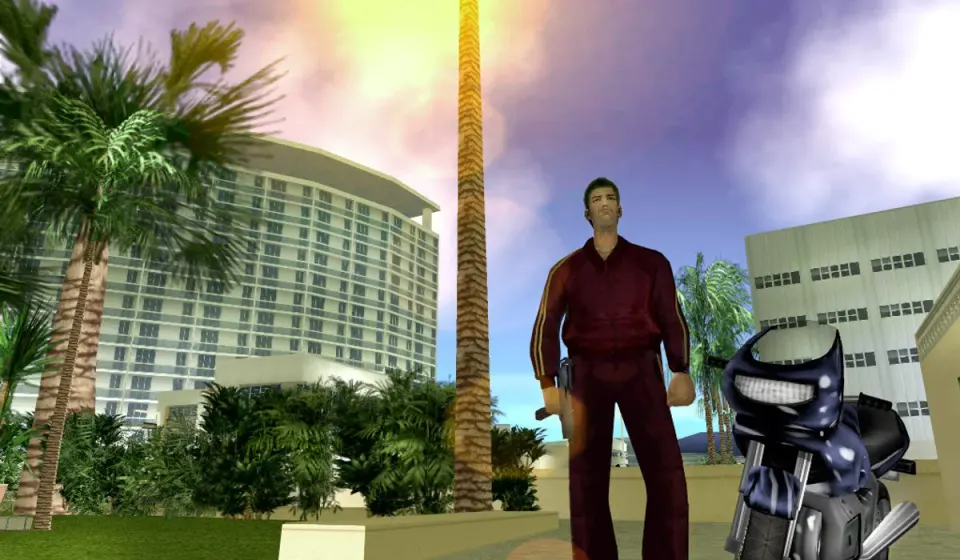
What Is GTA Vice City?
GTA Vice City is a third-person, open-world action-adventure game developed by Rockstar North and first released in 2002. Set in a fictional coastal city inspired by 1980s Miami, it follows Tommy Vercetti as he tries to establish himself after a criminal deal goes wrong. He crosses paths with rival gangs and ambitious locals.
The setting does much of the storytelling. Oceanfront hotels, neon storefronts, busy streets, and memorable radio stations give each neighborhood its character. Between objectives, you can explore at your own pace.
Follow the story, try side activities, or learn the streets. That freedom still makes GTA Vice City distinctive.
Can You Play GTA Vice City in a Browser?
Yes, there are unofficial projects that run the original PC-era game engine through WebAssembly. GTA Vice City browser play differs from a click-to-play web game: this project requires a compatible game.tar.gz archive from your lawfully obtained game data.
The linked project stores the imported files in your browser’s local storage. Later sessions can reuse that data on the same device and profile. There is no desktop launcher, but importing takes time and storage space.
This is neither an official Rockstar release nor a multiplayer service. For a supported commercial edition, check Rockstar’s official page.
How to Play GTA Vice City in Your Browser
If you have a legitimate PC copy with compatible files, the setup follows a straightforward sequence:
- Open the project in a current desktop browser.
- Prepare your own game archive. The project expects
game.tar.gzin a supported format; an installer or mobile app package will not work. - Select the archive. Choose the file in the project’s setup screen and allow extraction and storage to finish. The project documentation describes an archive of roughly 668 MB before extraction.
- Start the game. Once the import completes, select Start to play. Give the engine time to load before trying to restart the page.
- Back up saves before clearing site data or changing devices.
Touch controls are described by the project, but desktop keyboard and mouse are recommended. Performance varies by device and configuration.
Controls: Walking, Driving, and Camera
Common classic PC controls change depending on whether Tommy is walking or driving:
| Action | Typical PC control |
|---|---|
| Move or steer | W, A, S, D or arrow keys |
| Enter or exit a vehicle | F or Enter |
| Jump while on foot | Space |
| Sprint while on foot | Shift |
| Attack or fire | Left mouse button |
| Pause or open the menu | Esc |
| Change the camera view | V |
Bindings vary by settings and port; check the in-game menu. Practice braking and handbrake turns before difficult driving missions.
Explore the City, Missions, and Side Activities
Start with a drive along the coast and watch how the neighborhoods change. In GTA Vice City, the journey can be as memorable as the mission.
Take on story missions. Meet characters, follow map markers, and work through objectives involving driving, pursuits, and combat. Familiar routes make difficult objectives easier.
Explore different neighborhoods. Move from the beachfront through shopping areas and into busier inland streets. Notice bridges and landmarks to learn the map.
Try different vehicles. Cars and motorcycles feel different to handle, while boats and aircraft open up other ways to see the city as they become available. Handling matters as much as speed.
Discover optional activities. Taxi jobs, emergency-service challenges, and other side missions add variety when you want a break from the main plot. Exploration can also reveal useful pickups and locations worth returning to later.
Five Tips Before Your First Mission
A little preparation makes early missions less frustrating.
Save after meaningful progress. Use an available safehouse save point in the game. For browser play, also understand where the port keeps its local data; an in-game save is not the same thing as an exported backup.
Watch your wanted level. Police attention can turn a simple drive into a difficult escape. If your immediate goal is a mission, avoiding unnecessary trouble on the way there usually makes things easier.
Learn a reliable route. Some objectives have strict time limits or force you to travel across town. Driving a familiar road is often more useful than choosing the fastest-looking car.
Read the mission prompt. Check the destination, target, and vehicle requirements before moving.
Explore between missions. GTA Vice City rewards curiosity, and knowing the city helps when later objectives become demanding.
Browser Loading, Storage, and Save Problems
Local settings can affect this GTA Vice City port.
The first launch takes too long. Keep the tab open, check free space, and allow the archive import to finish before retrying.
The game opens to a blank screen. Update your browser, close heavy tabs, and verify the archive. Unsupported graphics features may prevent startup.
My progress disappeared. Local game data and saves may be associated with a particular website origin and browser profile. Clearing site storage, using private browsing, or moving to a new browser can remove access to that data. Export saves when the port provides that option.
Can I embed this version elsewhere? A working standalone page does not guarantee it will work inside an iframe. Storage restrictions, cross-origin security requirements, and the project’s own deployment rules need to be checked separately.
Classic Version vs. The Definitive Edition
The linked project is intended for the original GTA Vice City experience, not the remastered Definitive Edition. The classic game retains its period visuals, original-style presentation, and older control conventions.
The Definitive Edition is an official commercial rerelease with updated lighting, higher-resolution textures, increased draw distance, and revised controls. It is available through official storefronts, including Steam. Choose that version if you want a more modern presentation rather than experimenting with a community port.
Frequently Asked Questions About GTA Vice City
Is GTA Vice City free to play in a browser?
The browser software may be available without a launcher purchase, but GTA Vice City is a commercial game. The linked community project requires compatible game data from a copy you legally own. Do not assume a site promising an instant free full version has permission to distribute it.
Do I need to download GTA Vice City to my computer?
With the linked project, you import an archive into browser-managed storage instead of installing a conventional desktop executable. That still uses substantial local disk space and requires the correct game files.
Can I play GTA Vice City on a phone?
Rockstar has released mobile versions of GTA Vice City. Some unofficial ports also describe touch controls, but mobile performance and compatibility vary. For reliable mobile play, check the official version supported by your device.
Is GTA Vice City an online multiplayer game?
The original GTA Vice City is primarily a single-player story and open-world game. Running it on the web does not automatically add online multiplayer or matchmaking.
Will GTA Vice City save my progress in the browser?
The linked project includes save import and management features. Because local storage belongs to the browser and site, keep exported backups if you intend to clear browsing data or move your progress to another computer.
Is this the same game as GTA Vice City: The Definitive Edition?
No. The linked project targets the classic version, while The Definitive Edition is Rockstar’s updated commercial rerelease. The two versions differ in visuals, controls, and distribution.
Where can I get the official game?
Start with the Rockstar Games Vice City page to check official platform information and purchase routes. Availability can vary by device, region, and edition.
GTA Vice City and Grand Theft Auto are trademarks of their respective owners. This independent guide is not affiliated with or endorsed by Rockstar Games or Take-Two Interactive. Game files are not hosted on this page.